My web
Entering Income from Rental Property in DU

This document explains the specific steps for entering income from a rental property in DU. This document is not intended to provide detailed instructions for entering all the loan application data in Desktop Underwriter® (DU®).
You may scroll through this document or click a link to be taken to the information for the specified topic:
Rental Income not Associated with the Subject Property
Rental Income not Associated with the Subject Property
Enter the rental income not associated with the subject property.
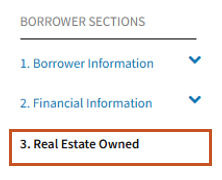
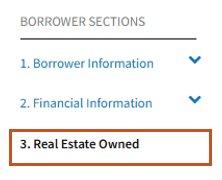
- Click 3. Real Estate Owned in the navigation bar.
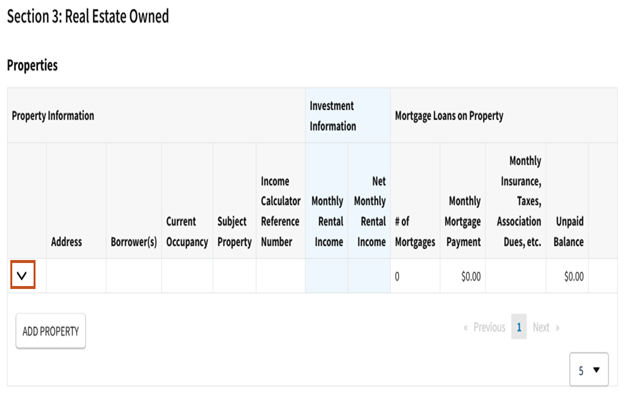
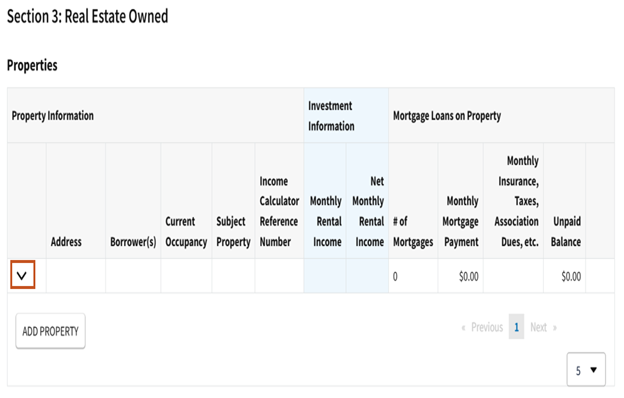
- The Properties screen, which contains a summary of the real estate owned information, will be displayed. Click the down arrow next to the investment property or 2-to-4 unit primary residence for which to enter rental income.
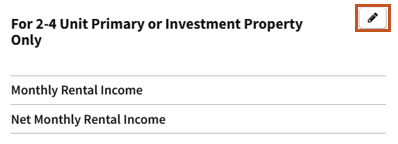
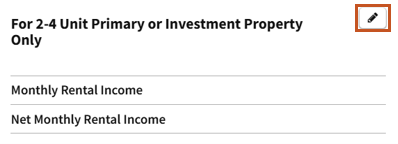
- Select the edit icon on the For 2-4 Unit Primary or Investment Property Only screen.
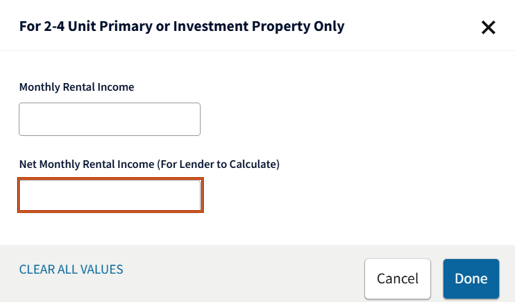
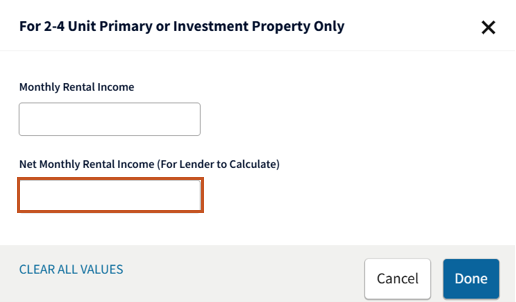
- For each investment property or 2-to-4 unit primary residence that is not the subject of the transaction, enter the rental income based on the guidance provided below.
When submitting rental income to DU for an investment property:
- The lender should calculate the net rental income amount for each property in accordance with the Selling Guide and enter the amount (either positive or negative) in the Net Monthly Rental Income field.
- If the Net Monthly Rental Income is a "breakeven" amount, you must enter either $0.01 or $-0.01.
- If Net Monthly Rental Income is not entered or is $0.00, DU will calculate it using this formula:
- (monthly gross rental income x 75%) – (mortgage payments + monthly insurance, taxes, association dues, etc. if not already included in the mortgage payment)
- The lender can override DU’s calculation by entering the Net Monthly Rental Income amount in the Net Monthly Rental Income field in Section 3. Real Estate Owned.
When submitting rental income to DU for the borrower’s principal residence that is a two- to four-unit property:
- The lender should calculate the net rental income amount for the property in accordance with the Selling Guide and enter the amount in the Net Monthly Rental Income field.
- The net rental income calculation is not reduced by the mortgage payment, which is always treated as a liability and included in the debt-to-income ratio.
- If Net Monthly Rental Income is not entered or is $0.00, DU will calculate it using this formula:
- Monthly gross rental income multiplied by 75%
- The lender can override DU’s calculation by entering the Net Monthly Rental Income amount in the Net Monthly Rental Income field in Section 3. Real Estate Owned.
Notes: DU will ignore a zero value in the Net Monthly Rental Income field. Therefore, in order for DU to use the net monthly rental income you provide (instead of calculating the amount using the monthly gross rental income) you must enter either a positive or negative amount. In other words, if the net rental income is a "breakeven" amount, you must enter either $0.01 or $-0.01.
DU does not include the mortgage payment and taxes, insurance, association dues, etc. associated to a non-subject investment property in the DTI because they should be factored into the net rental income calculation.
If the combined total net rental income for all borrowers is positive, DU adds the net rental income to the qualifying income. If the total is negative, DU treats the loss as a liability and includes it in the debt-to-income ratio.
If the borrower is purchasing a principal residence and is retaining their current residence as a rental property, the current principal residence must be identified in section 3. Real Estate Owned by selecting Retained in the Status field and Investment in the Intended Occupancy field. Net rental income to be earned on the property may also be entered and used to qualify in accordance with the above requirements.
Offsetting Monthly Obligation for Rental Property Reported through a Partnership or an S-Corporation
As described in the Selling Guide, rental income (or loss) must be evaluated as self-employment income when the property is reported on IRS form 8825.
When entering self-employment income in DU:
- For borrowers with ownership of 25% or more, the income must be entered in section 1. Current Employment/Self-Employment and Income in the Monthly Income/Loss (for Self-Employed) field.
- For borrowers with less than 25% ownership, the income must be entered in section 1b. Current Gross Monthly Income in the Other field.
Refer to the Borrower Information job aid for detailed instructions for entering self-employment income.
For cases when the borrower is personally obligated on the mortgage for the property, the property should not be listed in section 3. Real Estate Owned, and the personally obligated debt should be marked omit in section 2c. Liabilities - Credit Cards, Other Debts, and Leases that You Owe.
Refer to Selling Guide section B3-3.1-08, Rental Income, for additional guidance.
Subject Property Income
When entering rental income associated with the subject property, which would apply to either a 2-to-4 unit primary residence or an investment property, the data entry guidance will depend on the transaction type.
Subject Property Income for a Refinance Transaction
- If it is a refinance transaction, click 3. Real Estate Owned in the navigation bar.
- The Properties screen, which contains a summary of the real estate owned information, will be displayed. Click the down arrow next to the investment property or 2-to-4 unit primary residence for which to enter rental income.
- Select the edit icon on the For 2-4 Unit Primary or Investment Property Only screen.
- Enter the net rental income based on the guidance provided below.
- Investment property: Calculate the net rental income using the PITIA. If it is positive, it will be added to qualifying income. If it is negative, enter a negative value. DU treats the loss as a liability and includes it in the debt-to-income ratio. If income from the subject property is not used for qualifying purposes, the lender should enter the entire proposed PITIA as a negative amount.
- Two- to four-unit principal residence: Calculate the net rental income without subtracting the proposed PITIA. Net rental income will be added to qualifying income. The PITIA will be included in the debt-to-income ratio.
Notes: DU does not calculate the net rental income from the subject property based on the gross monthly income entered in the Monthly Rental Income field. The net rental income from the subject property should be manually calculated in accordance with the Selling Guide and entered in the Net Monthly Rental Income field, unless the subject property is a second home. Net rental income from a second home cannot be used when qualifying the borrower, and therefore, should not be entered on the loan application. See the Selling Guide for additional information.
On an investment transaction, DU does not include the proposed monthly payment for the subject property in the total expenses because it should be factored into the net rental income calculation for the subject property. On a 2-4 unit primary residence transaction, DU includes the proposed monthly payment for the subject property in the total expenses. See the Selling Guide for additional information.
Rental income from an accessory unit should be entered as Accessory Unit Income in Section 1e. Income from Other Sources in the online loan application.
Subject Property Income for a Purchase Transaction
- If it is a purchase transaction, expand 4. Loan & Property Information in the navigation bar and click Rental Income.
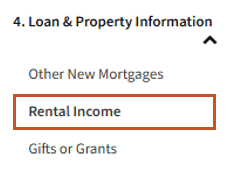
- Select the edit icon on the 4c. Rental Income on Property You Want to Purchase screen:

- Enter the expected net monthly rental income according to the guidance below.
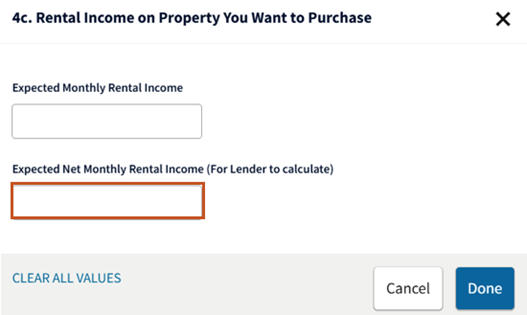
- Investment property: Calculate the net rental income using the PITIA. If it is positive, it will be added to qualifying income. If it is negative, enter a negative value. DU treats the loss as a liability and includes it in the debt-to-income ratio. If income from the subject property is not used for qualifying purposes, the lender should enter the entire proposed PITIA as a negative amount.
- Two- to four-unit principal residence: Calculate the net rental income without subtracting the proposed PITIA. Net rental income will be added to qualifying income. The PITIA will be included in the debt-to-income ratio.
Notes: DU does not calculate the expected net monthly rental income from the subject property based on the gross monthly income entered in the Expected Monthly Rental Income field. The expected net monthly rental income from the subject property should be manually calculated in accordance with the Selling Guide and entered in the Expected Net Monthly Rental Income field. Expected net rental income from a second home cannot be used when qualifying the borrower, and therefore, should not be entered on the loan application. See the Selling Guide for additional information.
On an investment transaction, DU does not include the proposed monthly payment for the subject property in the total expenses because it should be factored into the expected net rental income calculation for the subject property. On a 2-4 unit primary residence transaction, DU includes the proposed monthly payment for the subject property in the total expenses. See the Selling Guide for additional information.
Rental income from an accessory unit should be entered as Accessory Unit Income in Section 1e. Income from Other Sources in the online loan application.