My web
Certification Data Revisions

Certification Data Revisions Overview
Lenders can manage certification data revisions from their custodian directly within Loan Delivery.
Process:
Once a loan is submitted in Loan Delivery, the data will flow to the Document Certification system for the custodian to view. The custodian reviews the loan data submitted and compares it with the note they received. If they find any discrepancies in the data that was delivered, that is, the data doesn’t match what’s on the note for the certifiable fields, the custodian will enter the revision into their system.
Once a revision is submitted by a custodian, lenders have the option of accepting or declining the data revision. The data revisions are displayed on the Loan Delivery home page in the revisions table. They will be available for up to 30 days.
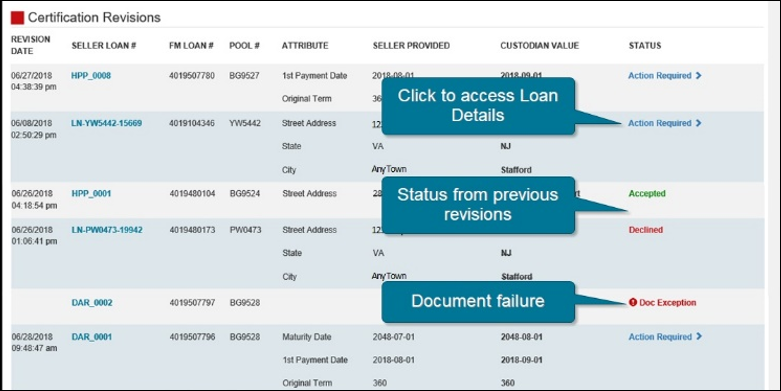
Click Action Required to go to the Loan Details page to accept or decline the data revision. For reference, data revisions previously entered will be identified with the applicable Accepted or Declined status. Any loans that have a document failure will be identified with an exclamation point and the Doc Exception status.
The Doc Exception status will identify loan(s) when the custodian identifies there is an issue with the documents sent to them. The loan will be identified as a Document Exception and the red Doc Exception status is displayed. Contact the custodian for more information on the specific document exception and resolution needed. Once the document exception is resolved, the Doc Exception flag will be removed from the data revision table.